
If you would like to learn how to start a travel blog of your own, this in-depth guide will give you the tools to do that. We have been running a successful travel blog for the past 11 years, and it is how we make a high 6-figure income annually.
When we started our own blog in 2008, we didn’t know where the industry was heading. We flew by the seat of our pants, hoping that one day we’d earn an income that would be able to sustain us full time. Luckily, we figured it out.
And now we can share what we have learned over the past decade so you too can start your travel blog on the right foot.
It might seem daunting at first, but don’t worry, if you follow these steps that we have outlined below, you will be on your way to starting your own travel blog and possibly a new way of life.
Table of Contents
11 Easy Steps – How to Start a Travel Blog
First…A Reality Check
When we started travel blogging back in 2008, it was a lot more difficult than it is today.
It involved a lot of hand-coding changes, and the themes were pretty primitive. Truthfully travel blogs just looked awful compared to today’s websites. Nowadays you can be up and running in one day if you want to. It’s a far cry from the early days when we really had no idea how to start our first travel blog.
What you have to remember is that if you want to make this a career, it’s a lot of hard work, time, and perseverance. You have to think long term. After all, there are a lot of travel blogs out there, so you need to do what you can to make yours stand out such that readers will consider your work a true resource.
It is not just heading out to travel the world and being able to write about travel. It involves working on different social media platforms like Facebook and Instagram, networking at conferences, optimizing for search engines, etc.
You can’t just throw the travel blog on autopilot after you start it and expect it to be successful.
The Crucial First Step to Starting Your Blog
Get a reliable hosting platform!
The first step toward starting a travel blog on the right foot will be one of the key things that will help you to become a successful travel blogger.
That means you have to have a reliable host. If you are just starting out then we recommend Bluehost. It is what we started with and is the most economical and reliable choice.
GET YOUR HOSTING AND DOMAIN NAME FOR 50% OFF FROM BLUEHOST RIGHT NOW
Do I have to spend money?
You are also going to have to spend a little money. Remember; Investing in yourself is the first step to travel blog success. We learned early on that if you want your travel blog to be a business you have to be willing to put money back into it. More on that later.
If you are just looking to do this as a hobby, and there is nothing wrong with that, then I suggest starting a wordpress.com account.
It is free and gives you the tools to update friends and family. But if you are more serious and looking to do this full-time, then continue reading. Either way, you need to make that decision, as competing with the best travel blogs in an effort to generate revenue is not something that’s going to happen by accident.
Step 1: Picking a Name
This is so important. We actually regret naming our travel blog The Planet D. We were going for a “Lonely Planet” type thing, and since our names start with a D we thought it was a good idea.

We were lucky; we could have bombed because our name doesn’t explain anything that we are about, but for some reason, we had success in spite of our name. Try to think of something that really shows off what your blog is all about.
Make sure your blog name is going to resonate years from now.
Travel Blog Names to Avoid
In our opinion it is better to avoid words in your blog name that restrict you to a particular type of travel, are really overused, or already used successfully.
A big part of having a successful travel blog is to make sure you stand out from everyone else, and your name is an excellent place to start. I am not saying that you can’t make a go of it with one of these I just think that after being in the business so long these seem to be the words that get oversaturated or overused.
For example, don’t pigeonhole yourself into the budget or backpacking niche if you think you will want to be doing more luxury travel in the future. And don’t use words that other travel bloggers have already branded successfully. Personal travel blogs are fun to read and you do need to present yourself to the reader (more on that below), but if you want your travel blog to be seen as that resource for readers, you need to make that clear with the name.
I would avoid names that include these words.
- Backpacking
- Budget
- Nomad
- Wander
- Vagabond
- Global
- Adventurous
- Luxury
Avoid Hyphens or Underscores
There is nothing worse when someone asks you what your blog address is and you have to say “blah dash blah dot com” they will instantly forget it. Not good when it is your livelihood. The key is to keep it simple yet effective.
It should describe your blog
Your blog name should be short and simple and tell the reader what you are all about in just that one phrase. I have noticed that a lot of travel bloggers who started early didn’t really think about this (Yours truly included). But some really stood out and chose their names wisely.
What comes to mind when you think of Expert Vagabond or Our Awesome Planet? It’s precisely what they want you to think. So get creative but keep it relevant to what you will be writing about.
Pick A Name that has Longevity
Trust me when I say you don’t want to be changing your name down the road. You don’t want to figure out how to start a travel blog more than once, as all the work you put into the first name may go to waste.
It is a massive pain in the ass. I know a few people who changed niches or found their names didn’t relate to the way they traveled anymore and had to change it. The technical side can be complicated, and you would have to start your social channels all over again. So make sure that once you choose a name, it is one you are going to stick with down the road.
Picking a name is not easy, and I think it is one step that most people don’t spend enough time on. It is the first representation of your travel blog brand and what you are about so make sure you take your time, bounce ideas off of friends and family, or even check out some Facebook Groups which can be very helpful in being brutally honest.
Step 2: Where are you going to host your blog?
This is the point where most people start to freak out. When thinking about how to start a travel blog, most people don’t delve too deeply into the “techie” aspects of it until they actually encounter it. Now is when you start wading into the technical side of things here, and it can be scary.
If you are technically challenged, like me, then all this mumbo jumbo about hosting can be a turn-off. Well, I have good news for you, it is really not that scary.
What is a Host?
Someone once explained it to me which was quite helpful. A host is a place that stores all of your travel blog content. It is like your little slice of the internet, and everyone who has a website has to have one. The difference between hosting companies is just ease of use and how much traffic they can handle.

When you are just starting, we recommend Bluehost. It is what we started on, and it is affordable.
We have actually secured a Special Price for The Planet D Readers, only $2.95/mth!
Plus the cost of your domain name is FREE.
Later on down the road when your website is getting crazy traffic, you can easily move to something more suited for that but realize that it is going to cost more money. We pay about $1000/yr for our hosting now!
How to Start a Travel Blog – what to do First with Hosting
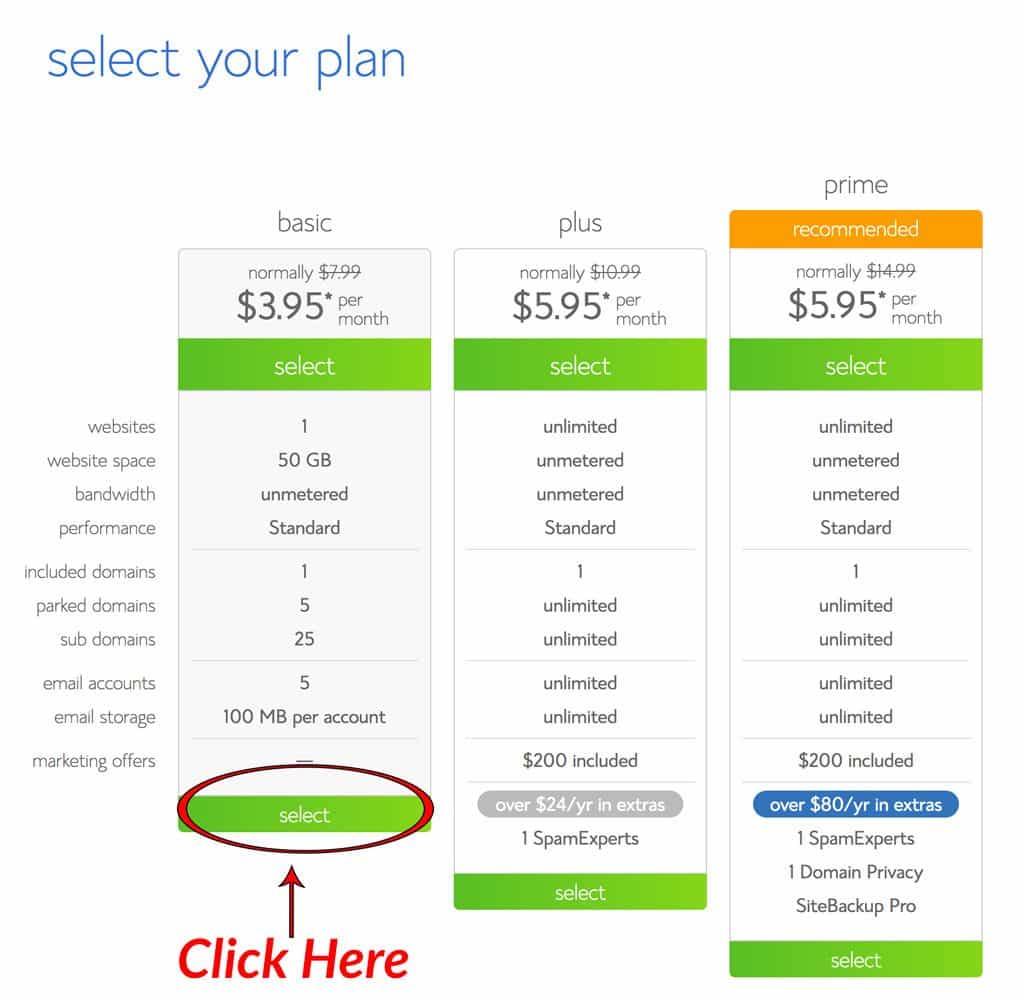
First head on over to Bluehost.com and click on the get started now button. Then get ready to choose your plan.

Choose your plan:
Another great benefit of Bluehost is that you can upgrade your plan as you go so we recommend starting with the basic package and then moving up from there as you grow.
Register your domain name.
Now it is time to register your travel blog name/domain name. You probably want a .com address as these are the most recognizable and trusted. If you already have registered your domain somewhere else, you can transfer it as well. It is good to have everything in one place.
Remember this is free with Bluehost.
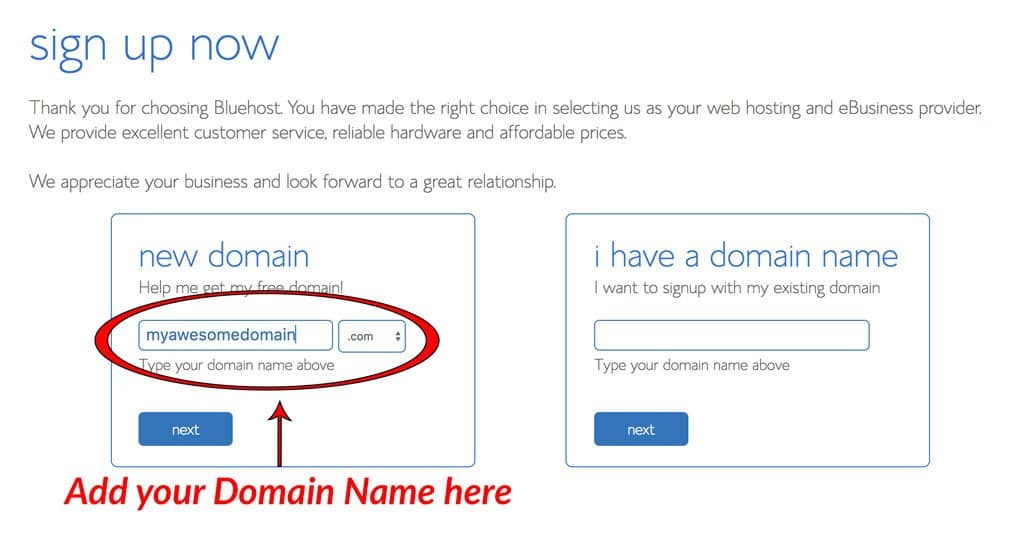
Type in your name to see if it is available. (If it isn’t you will have to go back to step one and brainstorm some more ideas.) If it is, click next and move to the final step. You are almost there.
Package information
It is getting serious now. It is time to choose how long you are going to register for. We recommend one year at a time.
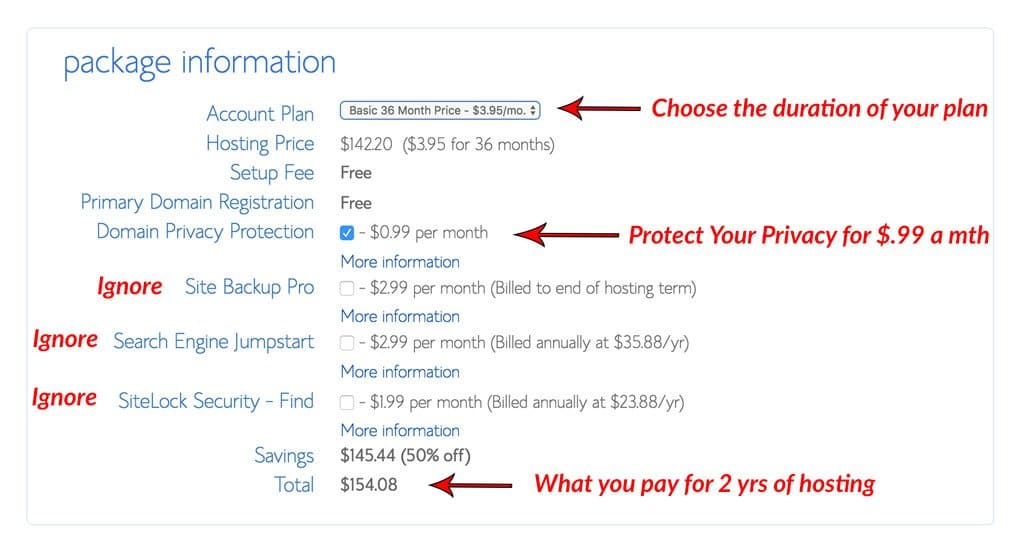
When choosing your package information, I would ignore most of the options because you don’t need them. But we do recommend Domain Privacy Protection. This protects your identity so people can’t look up who owns your site and personal information like address phone number etc. It is cheap for a little piece of mind.
Boom! You are done! You have just purchased your hosting and domain name. Easy right? Time to move on to the next step where we get WordPress all set up, and you can start creating content!
Step 3: Installing and Setting up WordPress
Now that you have website hosting and your domain name, you need a place to house your travel blog content. This is called a Content Management System or blogging platform.
WordPress is by far the most popular Content Management System out there, and it is free. It’s also the easiest to use.
You may have heard of Blogger, Blogspot, or Wix, but we do not recommend using these systems. If you choose a Blogger or Blogspot account, you will end up having a URL like this: theplanetd.blogspot.com. You don’t want that; you want theplanetd.com. I know tons of travel bloggers and bloggers in general who used one of these in the beginning and switching over to WordPress was a nightmare.
If you want to know the differences, then check out this very informative post by WPBeginner.com. It really gives you some great tips. WordPress is the best; it is used by most bloggers and large brands. We use it and feel it is the best. It has a proven track record, it’s been around for years, and it offers a lot of freedom to take control of your blog.
Installing WordPress with your Bluehost account is a snap.
How to Set up your Travel Blog on WordPress
Head on over to your Cpanel and scroll to the “Website Builder” section then click on the “Install WordPress” button. When it asks where you want to install it, be sure to choose the domain name you just registered – (http://myawesomedomainname.com)
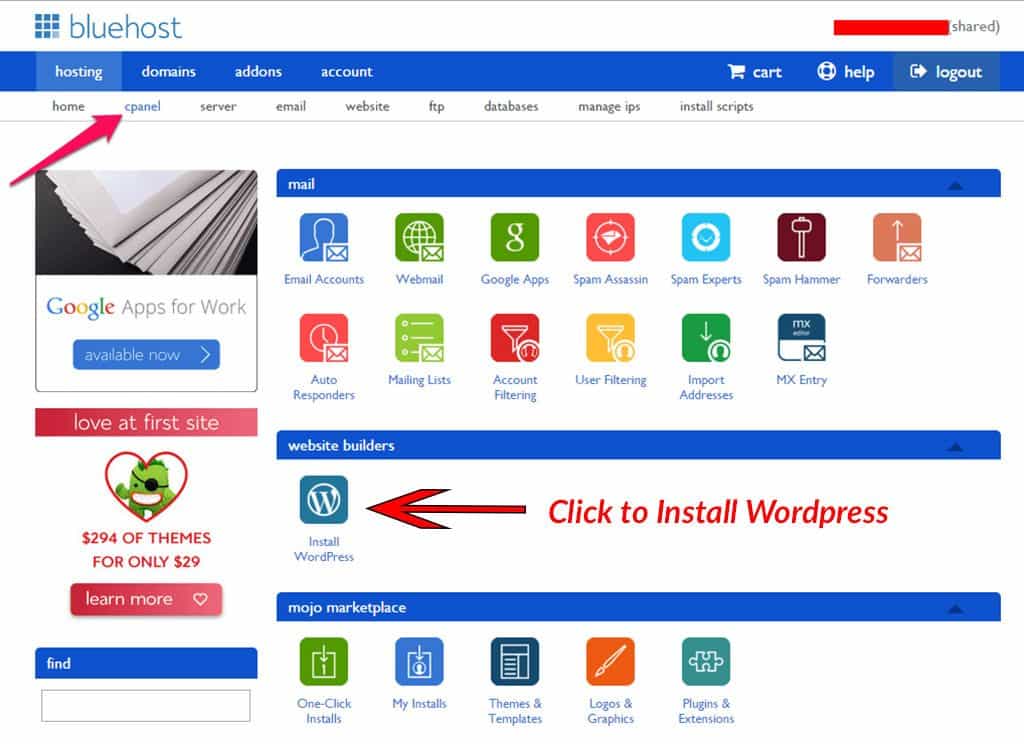
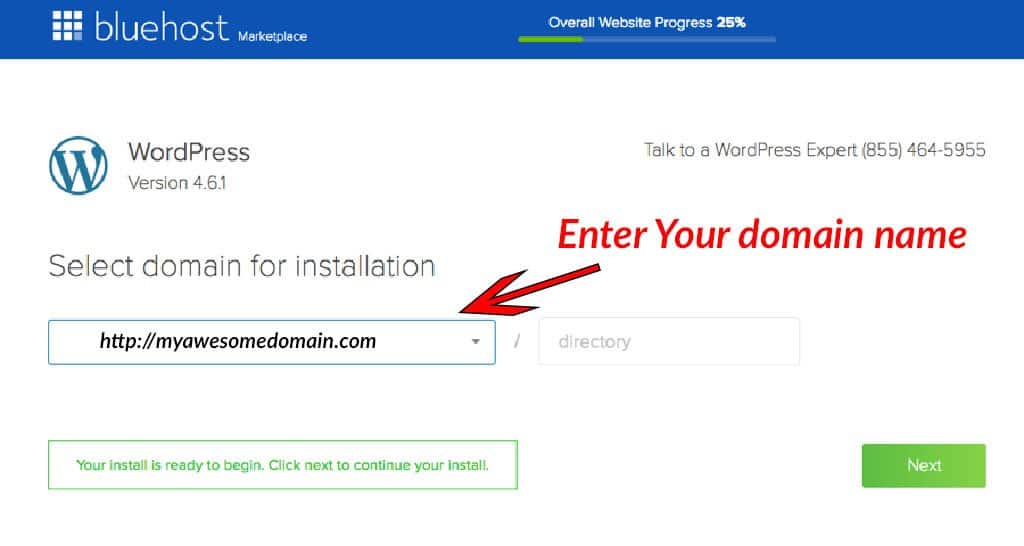
Once it is finished installing you will be able to login to your new blog via the WordPress dashboard at http://mydomainname.com/wp-admin/. Just punch in your username and password, and you are ready to go.
Congrats! That does it! You are done with the technical end of things, and now it is time to get creative and get your new travel blog ready for the world to see.
Step 4: Choosing a Theme
You are now at the point where you have to make some creative decisions. Learning how to start a travel blog starts to get really fun at this point.
WordPress comes with some pretty lame themes to get you started, but luckily there are a ton of themes to choose from to help you make your blog look the way you want it to. I would recommend you spend a little money here on a premium theme.
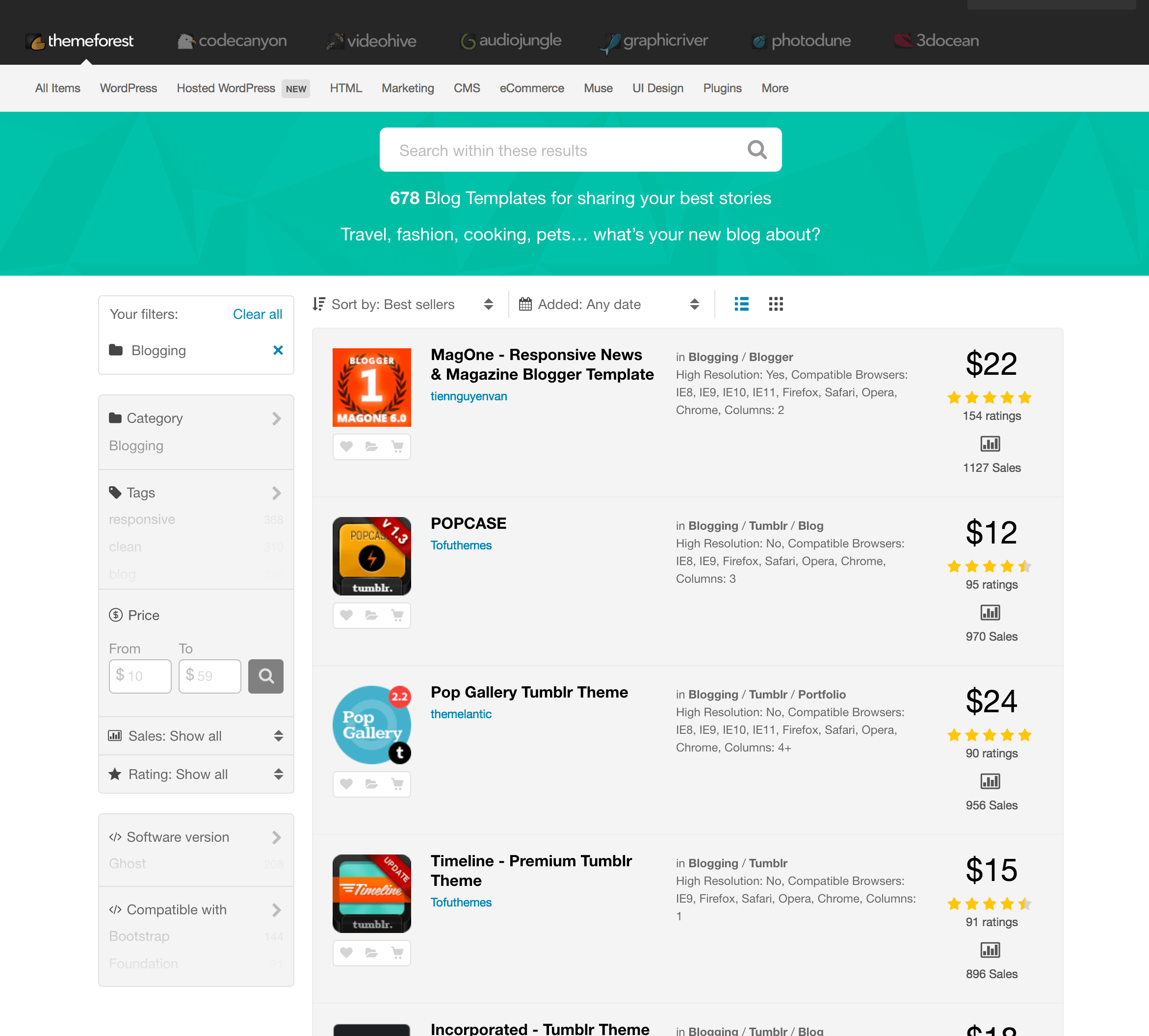
We made the mistake of when we first started just looking at the free themes. But by investing a little money when setting up your travel blog, you can get ones that are more customizable and come with support.
I find having support for a particular theme extremely valuable, especially when you are just starting, and worth the extra $100 you spend on a theme. You can check out Woo Themes or ThemeForest for some cool designs.
*Note* Take your time here. Changing themes often can really play havoc on your nerves. It is ok to update now and then but you don’t want to be doing it often as each theme handles things a little differently.
We have a custom theme but have used a few different ones in the past. If you have an idea of exactly how you want things to look you can hire a custom coder and designer to do that for you. I suggest checking out Upwork or Freelancer.com but be prepared to fork out some cash. It is not cheap.
Are you feeling Intimidated? Check out some WordPress Training to help get you started.
Step 5: Install Essential Plugins
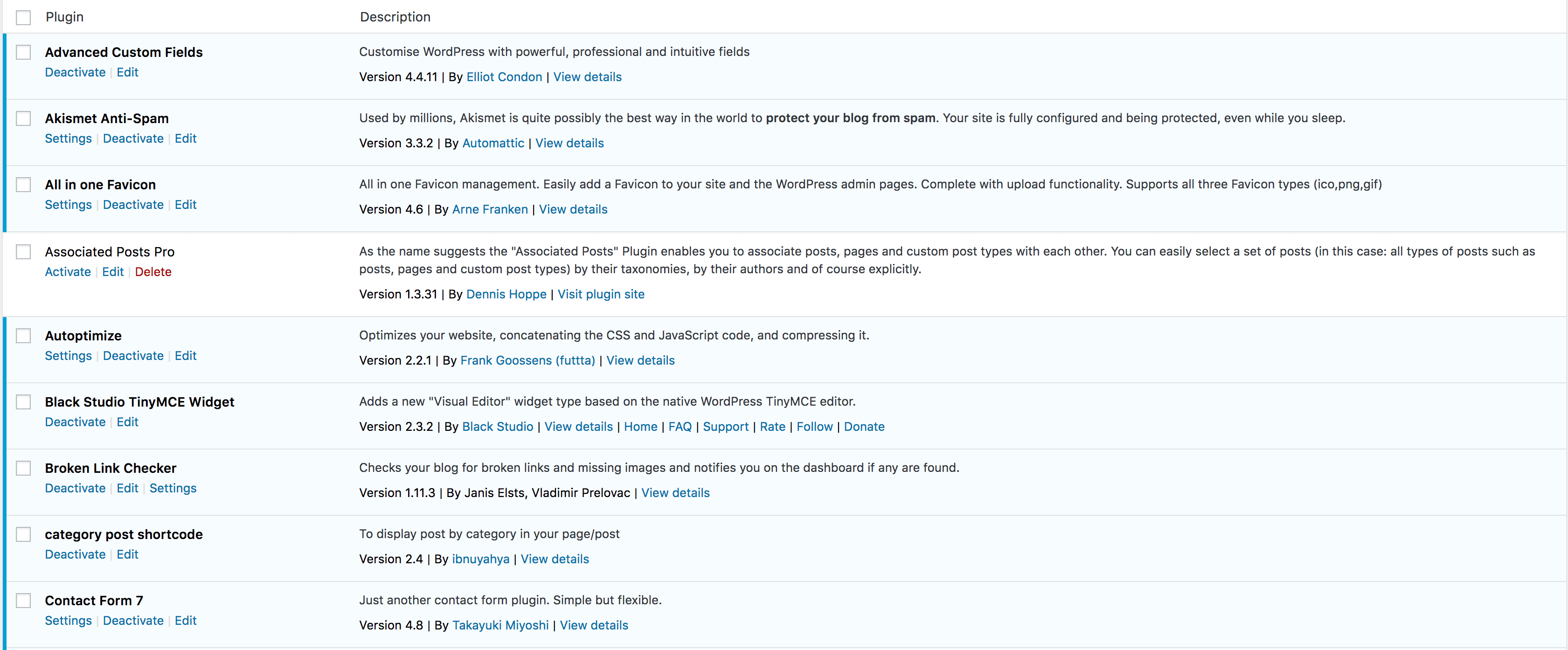
We struggled with this when we first started, and we have seen a lot of them come and go, but there are a few that we feel are essential when figuring out how to start a travel blog. You’ll also need to stay on top of new plugins to take advantage of a few that may be useful to you.
What is a Plugin?
Plugins are like little add-ons that help your site without having to jump into coding. So if you are not a coding wizard, then plugins were made for you. A word of warning though; more plugins does not always make things better.
If you overload your site with them, it can impede speed and functionality as well as increase the risk of conflicts (some plugins don’t play well with each other.) So my recommendation is to start with these plugins to get going and then build from there. A good rule of thumb is not to have more than 20 running on your site. But as always less is more.
Recommended Plugins:
- Akismet: An Anti-Spam Filter
- Yoast SEO: For all of your SEO needs
- Social Pug: For your Social Media Buttons
- WP-Rocket: This will help your site run faster
- Short Pixel Image Optimizer This will optimize your images.
- Contact Form
Step 6: Make the Most Important Pages First.
One of the main questions we get when we get asked how to start a travel blog is what pages should I make first.
Well obviously the Home Page is quite important, but your theme will probably define that. In my opinion, the most important page on your travel blog is your about page.
This is your chance to tell people what you are all about and tell them why they should follow you and keep coming back. The central part of personal travel blogs is “You,” and this is your chance to tell your story. It is where you can connect with the reader in the long-form and make a lifetime fan out of them.

What is in a good About Page?
I like to think it is broken down like this:
- Start by telling them how you are going to help them, eg. Provide valuable travel advice, inspire them, etc.
- Jump into your story. Tell them why you are publishing this travel blog and what motivated you. Something inspirational.
- Tell them about your specialty. What sets you apart from everyone else? Describe your niche.
- The final section should be about proof. Why are you an expert? Why should they listen to you? Have you won any awards that relate to your niche? What are your skills?
If you follow these four steps, you will be on your way to creating a kick-ass About page. After you have got that finished, I would move on to making a Contact Us page and then start writing that content.
Step 7: Setting up Your Social Channels

Social media is such a huge part of promoting and marketing your website that you have to be active. So make sure you grab your channels as soon as you can and try and keep all of your social channels the same name. Also, I know it can seem overwhelming at first but try and develop a strategy for each one. It just makes it easier to say, “You can find me @blogname on all our social channels.”
What Social Media Channels should I be on?
Step 8: Connect Your Blog to Google Analytics
Google Analytics is imperative if you are looking to make this into a business further down the road. The question of how to start a travel blog that generates revenue always revolves around data and managing that data.
Google Analytics is the best way to track your traffic and gives you great insight into your readers. You will be able to see everything from their age, where they come from, how long they spend on your site, and the pages they explore.
You can find out all you need to know about setting this up on the Google Analytics website. But, if you are looking for an easier way to get things set up I would recommend checking out the Monster Insights Google Analytics Plugin. It basically does all the heavy lifting for you so you don’t have to touch any code.
Step 9: Set up a Newsletter
Most people never talk about this but almost every successful blogger that I know wishes they had started their email list sooner.

Why is a Newsletter Important?
A newsletter lets you communicate directly with your reader. You go right into their inbox, and they choose to have you do this through the sign-up form. To have people that have chosen to read you each week or month is probably the most engaged of an audience you can have.
Plus, down the road, if you move into working with affiliates or developing a product, then this is the place you go first. This is why it is so important to start building early. Even if your first newsletters are just updates from the travel blog posts that you release weekly, it will start building trust with your readers and a relationship.
I also suggest investing in an email client that can grow with you. We have changed clients a few times, and it is a real pain in the ass. You have to get people to reconfirm their addresses, and you will probably lose some people by doing this. You don’t want that to happen.
I suggest Constant Contact to start out with.
They offer a 60 Day Free Trial so you can see if it works for you.
It may be a little more than you want to spend at the beginning, but in the end, it is worth the investment. They have templates you can use and are quite easy to set up and automate.

How Much is This Going to Cost Me?
Most people think that you have to have a ton of money when considering the question of how to start a travel blog. The truth is it can cost very little. When we first started, we drew on our experiences in places we had already been, so it even kept our travel expenses down. We have put together what you should set aside for the first year of travel blogging.
Now this will differ slightly for everyone depending on whether you have extra money that you want to put into Facebook Advertising or if your traffic grows immensely and you have to upgrade your hosting plan but for most this is what it will be:
- Hosting $3.95/mth X 12= $47.40
- Theme $100
- Email Hosting: $20/mth X 12= $240
Total Cost for 1 Year of Travel Blogging: $387.40 or $32/mth (6 Grande Lattes/mth at Starbucks)
Step 10: Getting Support
It can be a lonely, frustrating road on the way to travel blogging fame but luckily there are a ton of ways you can get some support and advice. There were certainly no support groups when we were starting out and I wish there were. They are not a requirement to figure out how to start a travel blog but if you are serious about it then it is worth the investment.
We are part of both communities and I still learn things in the Facebook Groups and Forums it is a great place to get support from people who are just starting out as well as seasoned veterans. For Travel Photography we recommend taking Photographing the World by Elia Locardi. We feel it is the best travel photography course out there. Read my review here.
Step 11: Start Making Money with your Travel Blog
I bet you never thought I would be talking about making money in a post about how to start a travel blog but it is possible.
As I mentioned about the newsletter, starting early is a perfect way to begin making an income from your blog. I know a lot of people say to wait until you build up large traffic to make money, but I disagree. The easiest way is to start making some cash is with affiliates.

Affiliates
Now I could go into a ton of detail about what affiliate marketing is and how you can do it but I found the Make Money from Affiliate Marketing course from Michelle of Makingsenseofcents.com does a way better job.
Michelle makes over $100k/mth from her blog and most of it is from affiliate marketing. She guides you from the very beginning, helping you put into place good practices so as your traffic increases so does your income.
Make Money with Affiliates Now!
This is probably one of the best courses I have ever taken when it comes to learning how to make money from your travel blog. It is worth every penny if you want to learn about monetizing through affiliates. But you can always go it on your own as well by signing up for affiliate programs like Amazon and Booking.com so that you can monetize through both products and accommodation and then if it is something that you are interested in getting more involved as you grow.
One note about promoting companies: It is much easier to sell a product or service you believe in than just being a shill for a product you have never tried. Success in making money with travel blogging is about honesty and integrity. We go by the motto: If we haven’t used it, we don’t promote it.
Common Questions about Starting a Travel Blog
When you first start out you can try out this method. As you get more established you can sell digital products, advertising, or partner with tourism boards to name a few.
It is pretty cheap to start a blog. Costs can vary from $200-$300/year. Check out the full breakdown here.
When starting out we recommend Bluehost. It is economical and easy. Here is a step-by-step guide.
Time to get to Work
Well, that should do it. We have covered all of the steps that you need to take to start a travel blog. By following these steps, you should be on the road to becoming a successful travel blogger in no time.
But remember, travel blogging is hard work. We probably put in more hours than most CEOs, but we love every minute of it.
One of the most wonderful things about coming up with travel blog names, formulating travel blog ideas, and starting a travel blog, in general, is that you get to do something you truly love to do. There’s no substitute for putting your professional effort into something you’re truly passionate about, as that doesn’t even feel like work most of the time.
If you are willing to put in the work and can offer something to your readers, you will no doubt have success in this business.
Good luck and if you have any questions, please leave a comment below and we will do our best to help you out.
Learn More About Travel Blogging and How to Start a Travel Blog with these Resources!
- How to Travel the World – The Ultimate Travel Resource
- 21 Ways to Get Paid to Travel
- Our best travel tips from years on the road
- How to Be a Professional Travel Blogger – 12 Steps to Financial Freedom
- Discover Your Passion – How to Find Your Path to Success
- Travel Resources
- How to Make Money Blogging
- How to Teach English Online Without a Degree
- 7 Common Travel Mistakes First-Time Travelers Make
Disclosure: There are some affiliate links in the post above, but these are all products we highly recommend. We won’t put anything on this page that we haven’t verified and/or personally used.


I stumbled upon this article while researching how to start my own travel blog, and I must say, it’s an incredibly helpful resource! The step-by-step guide provided by the authors is clear, and concise, and covers all the essential aspects of starting a travel blog. I appreciate the emphasis on finding your niche and developing a unique voice in the crowded blogosphere. It has definitely given me the motivation and confidence to take the plunge and start my own travel blog.
Starting a travel blog is easier today compared to a decade ago, but making it a successful career requires dedication, hard work, and perseverance. It’s important to focus on building a strong online presence and networking with other bloggers, along with optimizing for search engines. A reliable hosting platform like Bluehost is crucial for starting a travel blog on the right foot.
It was a pleasure reading your blog, Dave and Deb. I got the new inspiration to write a blog after reading your blog.
Thank You for this awesome guide
This is a great post, I think. I used to spend my much time to organize my idea for my travel blog. The domain contains desired keyword, was not available. They had been taken before. The most difficult thing may be to choose a right wordpress theme. I try many times, many themes but fail. It is also not easy to choose a hosting provider unless you have much money or have a very good guider. Many affiliate review to get paid from hosting company.
One of my friend start working on travel blog. He loves travelling, Now he start working on Youtube. Am sharing your article with my friend.
This is really amazing article for people who are just starting travel blog. You wrote everything step by step to make understand readers, Thanks a lot
I really like Thailand. I fly to rest there every year. Do you think it makes sense to create a blog about one country? Or will such a blog fail?
I had a big confusion that I was about to start a blog. But I was thinking of starting a food blog or travel. I have sound knowledge on both of the domains.
But after reading “theplanetd” I have changed my decision and am going to start a travel blog at the earliest.
Thanks for this motivating travel blog to the beginners like me.
You are welcome. Good luck with the new blog and we look forward to hearing how it goes.
Thanx for the article. Specially for a newbie like me. it helped a lot thanx again.
Two things I would like share here that,
This guide is really helpful for the people who would like to start a blog (travel).
Also, I’m impressed how you’re enjoying your life with travelling.
Thanks for this wonderful article and your experience.
Especially during Covid-19, I miss alot travelling. These steps will help me, after the virus is over. Thank you. 🙂
Another great post! This was super helpful for beginners like me! Thank you for sharing your experience.
another amazing post. Thanks for this post.
Looks like I need to travel more so that I can start my travel blog 😀
JK, nice article though!
another amazing post. Thanks for this post. learned a lot from this blog and still learning.
lookinf forward for many more
Hello Dave and Deb,
Another great post! This was super helpful for beginners like me! Thank you for sharing your experience. Great tips!
I’m curious. What was the most difficult part of this for you guys?
I really inspired from the blog, Now I could start my own travel blog. Thank you so for the very helpful blog.
Thanks! Let us know if you need any more tips on starting your travel blog.
Thanks for sharing this very informative post. I just bookmarked it.
Grat. Let us know if you need more information on how to start a travel blog. We are here for you.
Thank you for sharing your knowledge and I hope to keep learning and development in the future
Awesome. It can be a little scary to start a travel blog in these times. Hope this helped.
Hy Dave Bouskill,
I really appreciate you for sharing this article & full step-by-step guide about Start A Travel Blog.
Thanks For this and keep it up.
Again an excellent one from you! It’s wonderful to read about your journey as travelers and travel bloggers. There is so much to learn from your life. I agree that unless one doesn’t know whey he or she wants to travel, one cannot succeed as a travel blogger. There has to be enough passion to sail through.
Again an excellent one from you! It’s wonderful to read about your journey as travelers and travel bloggers. There is so much to learn from your life. I agree that unless one doesn’t know whey he or she wants to travel, one cannot succeed as a travel blogger. There has to be enough passion to sail through.
What a guide about traveling. Sir you shared one of the best guide about traveling
worlds best guide about starting travel blog you shared. Thanks for all guidance. Travelling the World on my car and freinds is something I look to do. Even some gain an excellent one from you! It’s wonderful to read about your journey as travelers and travel bloggers.
I really inspired from the blog, Now I could start my own travel blog. Thank you so for the very helpful blog.
Thank you for sharing! I just started my travel blog and this post is REALLY helpful!
Amazing Blog.
I really enjoy to read your blog and know about your journey. Informative Post for those who want to become blogger.
Thanks for the really specific recommendations. I’ve been blogging a while, but you have some resources here I hadn’t heard of.
This is an amazing guide, I have been starting blogging when finished this articles.
Hi Dev and Deb,
Amazing ideas and content. I have just started my travel website and was looking out for ways to promote it. Thanks for all guidance. Will check out the courses you are offering that will help me.
Thanks and Regards
Priyanka
Thanks for the pleasing post information; very useful guide helped me a lot
Thank you for sharing! I just started my travel blog and this post is REALLY helpful!
Thanks for the help, you explain each and every steps clearly, your article inspired me a lot to write more blogpost
It is a nice article. It increase my knowledge. Thanks for sharing such kind of informative article.
I am brand new at this and found your content very helpful. I am looking to incorporate supporting small businesses and giving a history of the towns they are in. How often do you post?
I had no idea it was so simply to start a travel blog, even without having to travel! Thank you for making me realize that, you have truly helped me in pursuing my passion. Really appreciate that!
thank you theplanetd for this amzing information, i am really happy to read it
That’s a great article. I really need this article. I am creating a blog but I don’t know what can I do. But this article helps me a lot.
Very Inspiring. One can only dream to one day own a travel blog, instead of a 9 to 5 job. I recently started my own blog on cycling hoping one day I can be in a similar position. Travelling the World on my bike is something I look to do. Once again man, love the blog. I plan on reading more articles soon. Thank you!
I was a little sceptical at first, but now reading your post I really have to say that your website is a pleasure and brings me a lot of joy 🙂 Please keep going!
Great guide.
It’s pretty helpful for beginners like us to take a step into writing travel blogs.
That’s a great article. I really need this article. I am creating a blog but I don’t know what can I do. But this article helps me a lot.
Excellent post, I’m planning to make my blog from México, thanks for your help.
Again an excellent article from you! It’s wonderful to read about starting a new travel blog. There is so much to learn from your website. I agree that if you want to be a successful travel blogger then one wants to travel and he must have a passion for it.
That’s a great article. I really need this article. I am creating a blog but I don’t know what can I do. But this article helps me a lot.
No one started out as a polished writer nor an expert content marketer. It takes going through great trial and tribulation in life and wanting to do this of free will. I’m glad to have come across successful travel bloggers like you and look forward to networking with you in the future and having a great “online working relationship.” Thank you for just being you in having a successful travel blog. You’re welcome to stop by and comment on the website and blog anytime.:-)
Thank you for sharing the valuable knowledge.
Your post is very interesting and informative, Thanks for putting such articles on your site
Amazing.. Your Article was simply Good.. Great Research for sure and you have an awesome resource Page.
Yup! Thanks for sharing!
Hello Dave and Deb! Thank you for all this useful information. I just started a new blog and your guide motivates me to keep going. I love to travel and I want to see the world. You inspire me with your blog posts and pictures.
Thanks for sharing this kinds of information its really helpful
Thanks for putting such articles on your site, it’s very helpfull and informative…
Your post is very interesting and informative not only for beginners.
Thank You
It’s really great. These days I am spending so many time to create a travel blog. This gude helped me 🙂 Thanks
Awesome Share! Thanks For Good Information 🙂
Thanks a lot for sharing
This article helped me a lot
Now i can built a successful travel blog!
This is great help for beginners like me
Thanks so much for publishing such a comprehensive guide. I’ve only recently started up my travel blog and it has been such an overwhelming but extremely satisfying experience.
Love this share, very motivational indeed.
Thanks so much for publishing such a comprehensive guide for Travel Blog. I think it is best category if you are starting the blogging…
Thanks for so awesome post. i was looking for such article for long and finally find yours. Thanks!
Thank you for motivating to start something creative .
A very nice to way to explain it Thank you
nice and very informative article, i learned so many things from this blog , that how to make a travel blog . thank you for the article, keep posting articles like that.
Hello Dave and Deb, thanks for the tips. your tips helped me alot.. and please keep posting like this kind of topics on your website .. it is really very helpful.
I always look to gather new knowledge. It’s the direction I like to go when reading webpages. I search it out. I’m especially interested in topics related to blogging and posts and general internet process so I am really pleased I found your page. It really was engaging to read. Thank you for that.
You have so much wonderful information and has really motivated me to pursue my long waited goal of starting a blog. I feel a little unsure still, so any additional tips on getting started and what to write (I know what I want to make my blog about, just unsure what to say to keep interest really) would be really appreciated!
It is Nice post as novice blogger like me. Thank you for sharing such a great post
This is great post to start blog from scratch.
Every step is very important as you described here.
Now, Will follow your blog and bookmarked it.
Thanks! for sharing
Well explained article to start a travel blog. I am currently running tech blog but need some more improvement. Do you have guide on starting a tech blog?
Again an excellent one from you! It’s wonderful to read about your journey as travelers and travel bloggers. There is so much to learn from your life. I agree that unless one doesn’t know whey he or she wants to travel, one cannot succeed as a travel blogger. There has to be enough passion to sail through.
Thank you so much for publishing such a comprehensive guide.I’ve started my first blog about cycling and travel almost one year ago but I plan to start a dedicated traveling blog some day in the future.
Thank you for sharing all this information. I am wanting to start a travel blog to share my love of travel and this post is so instructive and helpful!
This will be a great stuff.I have already a plan to start a travel blog in this new year.At that time I have seen this article. This is great help for beginners like me, and anyone else for that matter. Thank you for sharing your experience!
Great idea about how to start a travel blog. it is best guide to learn from expert. I’ve only recently started up my travel blog and it has been such an overwhelming but extremely satisfying experience. Thanks so much for publishing such a comprehensive guide.
Nice one.
lovely and helpful guide! blogg a better than a website and carring many for the web, blogg’s the best way for beginner, it’s open up a new community and be come a part of our life to sharing to anyone
thanks for posting and sharing!!! It’s great for who want to starter and have a plan to write a blog, those way are direct and easy to anyone
have a great day
Helps me a lot to motivate myself for this vacational tour. Found a lot of encouragement and tips to follow.
This is great advice, especially for me, and I love traveling because it helps me stay more focused and active. I learn a lot of new things visiting different places.Thanks so much for publishing such a comprehensive guide.
I am not really a travel blogger, but I have plans to become one when I have the luxury of time to do so. As far as I know, when it comes to travel blogging, passion is a must. Anyway, this article is really informative and inspiring at some point. Thanks for sharing this post by the way!
Thank You so much for this blog! I have a lot enjoy to read this blog and Very Interesting and Clear Pictures on your Blog. Your Blog is seriously awesome.
Thank you very much for the kind words!
we are about to start a travel blog on our portal spot my train status
This is a really great post. We’re totally new to blogging as our primary source of income has always been freelance software engineering. Will definitely be taking a look into some of these recommendations. Thanks for sharing!
I’ve already launched my blog, yet in its infant state I feel I have so much to learn and so enjoy reading posts like these by the sharks of the blogging world.
Refreshing to see someone recommend to get into affiliate marketing sooner rather than waiting around! Still got quite a bit to take care first but reckon I’ll get the ball rolling on that in the next few months. Thanks for the advice on Michelle’s course, might check that one out!
This is a really great post. We’re totally new to blogging as our primary source of income has always been freelance software engineering. Will definitely be taking a look into some of these recommendations. Thanks for sharing!
Great idea about how to start a travel blog. it is best guide to learn from expert. thanks for sharing this blog
I think the content, finding a niche … is the most important, and also how to turn visitors into clients (and money), out of the box thinking. Adsense and affiliate is great but then you count on others, “invent” your own products, write ebooks, …
Try to be different from the 1001 other travel blogs, and find someting unique … so u can work on that, google has only 10 positions on the first page , …
regards
Wouter
Hello Dave and Deb, thanks for the tips. We started a Luxury travel blog more than a year ago and we don’t have many visitors yet despite our what we believe to be quality content.. I will try some of your tips. Thanks.
good luck. A year isn’t very long, so don’t fret yet. it can take a while for people to catch on, but I am sure that you will start to see more visitors soon. Just keep at it. Best of luck!
Just came across this post. There is some great advice in here. I find it difficult having a full-time job and trying to really blog. All the photos on our site are ours, so I’m trying to learn photography and editing software, learn how to write effectively, etc. But I love doing it so I’m going to keep at it. Thanks for the tips!
This is an amazing guide, I have been starting blogging when finished this articles. Now I am starting up o my travel blog. Cheer…
This is great advice, especially for me, beginner traveler and blogger. Thanks a lot guys!
Besides of the travel story, nice pictures, etc, do you need to be good at writing? How do you improve your writing or find the right style for you?
A lot of friends ask me about how to start a travel blog because they think it’s so easy! I mean it’s easy to blog, it’s more challenging to make money from it. 🙂 Good read for those who’re looking for a simple, comprehensive guide on starting a travel blog.
As you said passion is something makes us keep on doing what we do for long period of time. I love travelling because it helps me stay more focused and active. I learn lot of new things visiting different places. Happy to see you even blog together with name Dave and Deb !
Hi I Am Raj I Am a Travel Agents From India and I read your Article carefully and there I got many information and many things. this is very nice and I am going to give You Excellence for this Blog. Your Blog Written very Nicely and Your Thoughts are Awesome.
This is such a great post, thanks for sharing
Thanks so much for publishing such a comprehensive guide. I’ve only recently started up my travel blog and it has been such an overwhelming but extremely satisfying experience.
I’ve started my first blog about cycling and travel almost one year ago but I plan to start a dedicated traveling blog some day in the future. I see that today it’s easier than ever to do so. Traveling the World is the best way to fulfill your life with happiness and love. I found your blog today and I love it man. I’m going to read most of the articles about traveling. Cheers!
Your post is very interesting and informative not only for beginners. Thank you for sharing your experience! You really made a nice job. Very good tips.
A very useful guide – thanks! I love blogging and I get carried away with wanting to set up new blogs all the time. I’m just in the process of considering whether to add a third blog to my list of current blogs (a spin-off from one of my existing blogs) or whether to concentrate on growing the two that I have already. Decisions, decisions! One thing is for sure – blogging opens up a whole new community to you and it becomes a big part of your life. I have lots of friends who are about to start their blogging journey so I’ll share this post with them.
In fact the article is very interesting indeed, I agree with the words of Iris Milton. At this point in my life, I need to focus on another project, but this article has planted a seed here in my mind. Thank you.
This will be a great stuff.
What web hosting do you use now? I’ve heard that when a blog starts getting really popular, that you need to switch to a different host, but I haven’t heard of what companies are good. I would love to know what company you use now because your site is fast and it can handle all of your beautiful pictures, and all of your traffic. Any help you can give would be appreciated. Thanks!
We now use web synthesis. We started with blue host but you are right, we had to move on to a dedicated host. It’s good to start with the likes of BlueHost, but as you grow, it’s great having a dedicated host for speed and to handle the larger traffic. We really like web synthesis, it has good support and it is quite reliable.
Thanx for the article. Specially for a newbie like me
nice ideas. how we will make it to launch travel blog on our website.
We are looking at taking the TBS later this year. Want to take our blog to the next level. Great to hear your thoughts on them.
This will be a great stuff.I have already a plan to start a travel blog in this new year.At that time I have seen this article and that will help to plan and develop a travel blog.www.travelblogonline.com this will be my blog.Wish you have w wonderful new year.
It has been the great stuff, I have followed this ideas and it has helped me.
It is admiring that you found your passion in life and a way to pursue your dreams.
I’m in my late 20s and at grad school and I’m finding myself more often asking the question “what the hell am I doing here?”. Travel was always a passion and I am curious how much it is going to influence my life in the future.
Well, what I wanted to say is, that I just recently stumbled upon your blog, and I am looking forward to read more about your adventures and to get inspired (:
– Olga
Inspire is probably the best word to describe what you two have done for me and many others. I’m glad that is what you strive to do because you hit the nail on the head. I didn’t know what I was getting myself into when I jumped into the travel blogging world, only that I wanted to share my adventures with those around the world in the hopes that they travel or at least experience a new part of the world through me. I am SO SUPER excited for TBEX and meeting you two, as a 2 month old blog, I think I’m over my head but I’m loving it. Traveling and sharing my journey is my passion so it is great to know I’ll be meeting so many others that have the same outlook! Ciao!
Thank you Adrian! I am so excited for you. It sounds like you have gone into travel blogging for all the right reasons. People need to be able to dream. Before we started traveling, we were always looking through magazines and reading books about travel. It was those dreams that sparked our interest and eventually led us here! Make sure to find us at TBEX to say hi. We’ll keep an eye out too, but a word of warning, it can be very big and busy. If you’re feeling overwhelmed, come over to say hi!
Loved hearing you guys speak at TBEX Cancun! Great article, and thanks for the link to the NYT article– had totally missed that one, interesting read. I am only a year out but totally agree, it’s about having a passion for your niche, otherwise it must grow tiresome quickly. It’s clear even after all these years you guys love what you do, and that makes all the difference. A supportive community helps too– TBS is an excellent place to brainstorm, just got some useful ideas today from some of the members.
Thanks Kristin, we always love speaking at TBEX and attending too! We’re heading to Athens to watch and learn from our fellow bloggers and looking forward to sitting back and relaxing. Glad we could send you on to that link. It can be a grind if you let it, but we got into Travel Blogging because we loved to travel, we’re working hard to make sure that we keep it fresh and fun. And you are so right a supportive community does help. TBS is excellent for that. I love the forums there.
Thanx for the article. Specially for a newbie like me. it helped a lot thanx again.
Glad we could help! Best of luck.
Helps me a lot to motivate myself for this vacational tour. Found a lot of encouragement and tips to follow.
Glad we could help Jin. Best of luck in your travel blogging career!
Great post guys. I can relate to crying at the thought of going home! I couldn’t control myself on the way home from India 🙂
I’m seeing these Travel Blog Success posts everywhere this week, and thinking of doing it,I just have to somehow get the money together for it!
I hope you had a good time in ireland 🙂
Hi Christine, hope you get the funds together to give it a try. There’s a lot of information out there in the meantime where you don’t have to join a course, you can always start off independently by reading things on our Plan it Page and other travel bloggers give a lot of tips too! You can then ease into Travel Blog Success for the future. Best of luck to you and let us know if you need any advice.
Thanks for sharing your story. It’s very interesting and it motivates to keep going and take a part of “the best job in the world”. It also inspires us as a travelling couple. Keep sharing your adventurous stories.
Best of luck to you Sabine. Dave and I think it is wonderful to be able to travel blog together. We can give each other support and double the work load. Great to see another couple out there seeing the world too! Best of luck and yes, enjoy your journey to discover the Best job in the world!
We are looking at taking the TBS later this year. Want to take our blog to the next level. Great to hear your thoughts on them.
Good luck Hannah! Joining a community like TBS does help. You can ask advice, listen in on tutorials and create your own schedule. It really does help to get some motivation and organization to bring your travel blog to the next level. Cheers!
Again an excellent one from you! It’s wonderful to read about your journey as travelers and travel bloggers. There is so much to learn from your life. I agree that unless one doesn’t know whey he or she wants to travel, one cannot succeed as a travel blogger. There has to be enough passion to sail through.
Thank you so much Renuka. We have really appreciated all of your comments over the past months. You are growing your travel blog quite nicely! It’s great to see people having success in a job that they love. You are so right. When you have a passion for something it gets you through the tough times. No life or job is perfect, but when you love what you do, it’s comes pretty close!
nice, I have one quest.. regarding earnings ….. How do travel bloggers earn?
pls reply…
Hey, Dave and Deb!
Your post is very interesting and informative not only for beginners. Thank you for sharing your experience! You really made a nice job. Very good tips.
Passion is needed for sure! We have been capturing our adventures faithfully on the web since 1997, the term blogging didn’t even exist. I just loved your featured image and had to keep on reading.
This is great help for beginners like me, and anyone else for that matter. Thanks a lot! Especially for the 25%!
Glad we could help Jake! Best of luck to you and if you have any questions give us a shout!
A lot of friends ask me about how to start a travel blog because they think it’s so easy! I mean it’s easy to blog, it’s more challenging to make money from it. ? Good read for those who’re looking for a simple, comprehensive guide on starting a travel blog.
Right Sohail,
Blogging in the travel category, not an easy task but here in this article the planted made it an easy task. We can start our travel blog journey by reading this very helpful article.